
AI tool
AI Product Video Ad Generator for Ecommerce
Create short product video ad candidates from an approved image and brief, with connected model settings, visible Credit quotes, real outputs, and QA.
- Workflow
- marketing.photo-video-ad
- Real model examples
- Hailuo and Seedance
- Historical estimates
- 75–113 Credits
- Output role
- Review candidate, not approval
Direct answer
An AI product video ad generator turns an approved product image and motion brief into a short visual candidate for an advertisement. In yito, the photo-to-video-ad workflow keeps the selected model, source, prompt, duration, aspect controls, Credit quote, task, and artifact connected so you can review product identity before adding copy, audio, offer, and CTA.
Verified production outputs
Generation cases retain the input, settings, and historical cost; local audits retain the inspected file and every observed check.
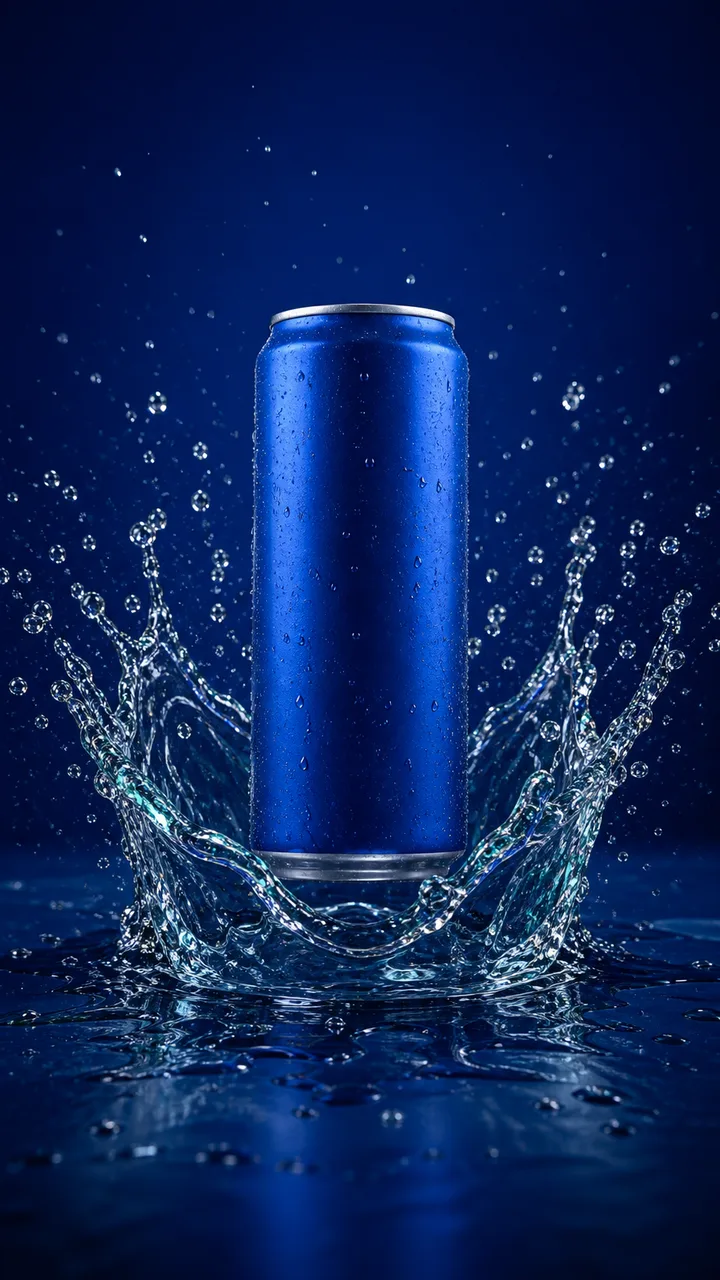 Input
InputBlue beverage can water reveal
Model: Seedance 2.0 Mini via Kie
Four one-second checkpoints retain one blue can, its silver rim, cylindrical geometry, central placement, cold highlights, and water setting. No text, logo, label, fruit, hand, or extra can appears.
The landscape crop removes splash detail from the portrait source, water geometry changes between frames, and the unbranded source does not test preservation of small packaging text.
- Aspect ratio
- 16:9
- Resolution
- 720p
- Duration
- 4 seconds
- Audio
- Off
- Historical Credits
- 75
Observed failures
- The 16:9 crop removes some water detail above and below the can from the original portrait composition.
- Individual droplets and the water surface change between frames, limiting compositing continuity.
- A branded package needs a separate label and logo review because this source intentionally contains neither.
 Input
InputAmber serum product reveal
Model: Hailuo 2.3 Fast via Replicate
The accepted output keeps one amber bottle, the dropper, dark stone setting, and warm highlight direction recognizable through the clip. No new logo, product claim, hand, or second bottle appears.
The small label area cannot prove character-perfect text preservation, and the delivered four-second artifact is shorter than the six-second request recorded by the editorial run.
- Prompt motion
- Slow orbit, restrained atmosphere
- Requested duration
- 6 seconds
- Delivered artifact
- 4-second MP4 + WebM
- Audio
- None
- Historical Credits
- 113
Observed failures
- Reject a retry if the dropper, bottle shoulder, label area, material, or product count changes.
- Small printed packaging text still needs a frame-by-frame comparison against the approved pack artwork.
- The atmospheric particles and reflections move synthetically and should not be presented as ingredient evidence.
Open the full guide, FAQs, and sourcesUse the detailed method when you need it without extending the tool by default.
What the product video ad workflow generates
The workflow creates motion from a source product image and an advertising brief. It is narrower than a generic video prompt: the source should define the product, while the brief defines camera behavior, restrained object motion, duration, framing, and features that must remain unchanged. The returned clip is a visual layer for an ad. It does not automatically create or approve the offer, headline, voice, captions, disclosure, audio license, landing page, SKU link, safe-zone layout, or platform submission. Keeping that boundary visible prevents a technically successful generation from being mistaken for a finished commercial asset.
Source images and products that work best
Choose one owned or licensed image with the full product, clean edges, accurate color, sufficient resolution, and enough space for the requested camera move. Rigid bottles, cans, ceramics, packaged goods with a separate verified pack shot, compact electronics, and home accessories can work when the motion is restrained. Avoid a single-view generative reveal when hidden geometry, safety labeling, small legal text, transparent internal structures, reflective controls, garment fit, articulated mechanisms, or an exact demonstration is critical. The model cannot reliably reveal a factual rear panel or included accessory that the source never showed.
Real model settings and Credit estimates
The retained beverage run used Seedance 2.0 Mini with first-frame image-to-video, 16:9, 720p, four seconds, audio off, and a 75-Credit estimate. It delivered H.264 at 1280 × 720 for 4.041667 seconds. The beauty and transparent-speaker editorial cases used Hailuo 2.3 Fast with slow single-shot motion, no text or logos, and 113-Credit Studio estimates. Their retained files are four seconds even though the editorial requests recorded six. These historical values document real runs; the quote shown in the workflow before a new submission is the current estimate.
Review the full video for product failures
Inspect several timestamps at full size and compare each with the approved source. Reject changed label characters, logo geometry, cap, dropper, handle, seam, driver, port, material, color, quantity, proportions, included accessories, or an invented person and prop. Verify delivered width, height, duration, codec, and audio rather than assuming submitted settings were honored. The beverage output cropped a portrait composition into landscape; a separate Kling comparison returned square video after a 16:9 submission. Water, particles, reflections, and camera motion are stylistic and cannot prove product performance or ingredients.
Assemble the accepted clip into an ad
Place the accepted output in the real channel canvas without stretching. Select a product-readable poster and opening frame, preserve space for interface and subtitles, use only approved claims, add licensed audio, and link the exact offer. Keep a factual product still available for shoppers who need details. For TikTok Shop, run the safe-zone and duration checks and verify permissions before submission. For Shopify, test the theme’s media component, mobile crop, load behavior, and poster. For an agency handoff, include source, prompt, route, settings, quote, output, review decision, failures, and channel version.
Generate one controlled candidate before scaling
Start with the hardest representative product rather than a large batch. Approve the source and preservation rules, submit one route, record the live Credit quote, inspect the file, and decide keep, revise, or stop. If identity fails, improve the source or use conventional footage; if aspect or duration fails, change the route or layout; if the clip passes but the assembled ad does not engage, revise the creative hypothesis rather than blaming generation reliability. Track CTA selection, generation start, successful artifact, checkout, and paid conversion as separate events so SEO traffic can be evaluated against business outcomes.
Explore next
What to keep in mind
The generator produces review candidates, not factual certification or platform approval. Product claims, rights, packaging, permissions, disclosures, audio, accessibility, placement, and final publication remain human responsibilities.