
Practical guide
AI UGC Video Ad Workflow for Performance Teams
Build repeatable UGC-style video ad variations from an approved brief and owned product assets without creator shipping delays or reshoots.
- Core workflow
- Brief → modular clips → review
- Target channel
- TikTok, Reels & Shorts ads
- Primary bottleneck
- Creator shipping & reshoot delays
- Best plan fit
- Pro (solo) or Max (team)
Direct answer
A reliable AI UGC video ad workflow separates script planning, visual proof clips, voiceover pacing, and compliance review into four repeatable stages. Start with one owned product visual and a concise hook brief, generate short modular b-roll clips rather than one long single-take video, inspect product identity at key frames, and assemble approved variants for paid social testing.
Verified production outputs
Generation cases retain the input, settings, and historical cost; local audits retain the inspected file and every observed check.
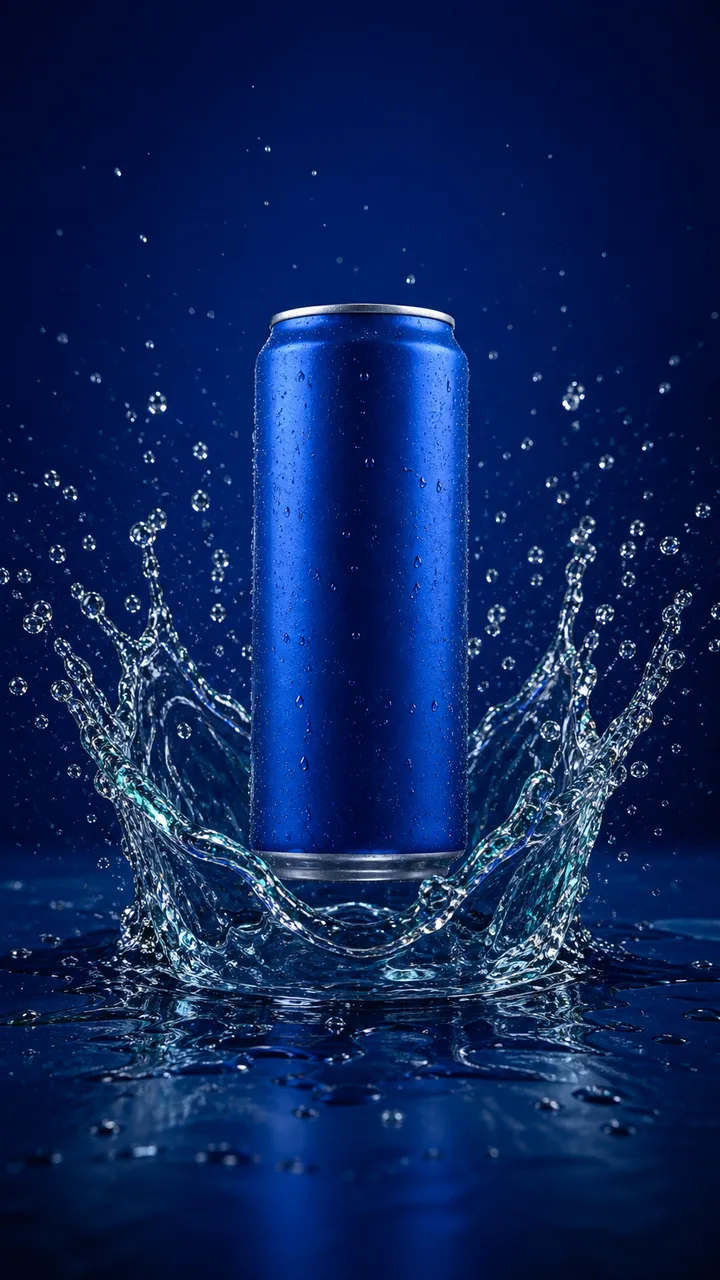 Input
Blue beverage can water reveal
Model: Seedance 2.0 Mini via Kie
Four one-second checkpoints retain one blue can, its silver rim, cylindrical geometry, central placement, cold highlights, and water setting. No text, logo, label, fruit, hand, or extra can appears.
The landscape crop removes splash detail from the portrait source, water geometry changes between frames, and the unbranded source does not test preservation of small packaging text.
- Aspect ratio
- 16:9
- Resolution
- 720p
- Duration
- 4 seconds
- Audio
- Off
- Historical Credits
- 75
Observed failures
- The 16:9 crop removes some water detail above and below the can from the original portrait composition.
- Individual droplets and the water surface change between frames, limiting compositing continuity.
- A branded package needs a separate label and logo review because this source intentionally contains neither.
Open the full guide, FAQs, and sourcesUse the detailed method when you need it without extending the tool by default.
1. Structure the ad into modular three-second beats
Performance teams burn credits quickly when they ask one generation to deliver an entire 30-second commercial in a single shot. High-converting UGC ads work because each three-second beat has one clear job: pattern-interrupt hook, product reveal, texture or benefit proof, and offer close. Generating each beat separately from verified product stills keeps camera motion controllable, simplifies regional localization, and lets media buyers swap opening hooks every week without regenerating the middle of the ad or discarding approved product proof.
2. Anchor every product beat to an owned source image
Text-only prompts invent packaging shapes, colors, and labels that violate platform accuracy rules and disappoint buyers after delivery. Feed your cleanest approved product photograph into image-to-video workflows for every shot where the SKU appears on screen. Keep the product centered inside vertical 9:16 safe zones with comfortable top and bottom margins so platform captions, profile icons, handle names, and shop buttons never block the label or silhouette during playback.
3. Pair concise hooks with natural spoken cadence
Write hooks under twelve words that name one concrete buyer frustration rather than generic product hype or exaggerated promises. Keep generated video beats silent when you plan to sync clean voiceover and licensed music in post, or test dedicated lip-sync and avatar tracks on separate talking-head segments. Separating visual product proof from voiceover lets growth teams launch English and Spanish creative sets from the exact same approved video renders without doubling generation spend.
4. Audit product truth, hands, and claims before spend
Before putting paid ad budget behind an AI-assisted UGC cut, run a mandatory human audit against your physical product specification sheet. Check that packaging count, surface finish, cap shape, color tone, and front label placement match the real item customers receive. Reject frames with unnatural hand movement, warped straight lines, invented text overlays, or exaggerated before-and-after visuals that can trigger ad-account disapprovals or avoidable customer returns.
5. Package three hook variants per testing sprint
Creative fatigue hits paid social feeds within days, so treat every approved product beat as a reusable library asset rather than a disposable single edit. Pair one verified product demonstration with three distinct opening hooks—problem-first, visual-contrast, and demonstration-first—and export clean masters for TikTok, Meta Reels, and YouTube Shorts. Store approved clips inside private brand workspaces so reviewers can trace every live ad back to its original approved source photo.
6. Budget weekly test volume on one predictable balance
Check live credit quotes inside Studio before running each batch so cost per tested hook stays transparent for finance and media buyers. Solo growth marketers launching weekly ad sets fit well on Pro, while multi-brand teams producing campaigns across several storefronts benefit from Max seats, dedicated client workspaces, and larger monthly credit pools backed by a 3-day full refund if paid credits remain unused.
Frequently asked questions
Why generate modular 3-to-5-second clips instead of one 30-second video?
Short clips preserve product geometry better, reduce wasted retries, and let media buyers swap opening hooks or localize voiceovers without regenerating the entire ad.
Do I need real product photos to produce AI UGC ads?
Yes. Starting from an owned, accurate product photograph keeps SKU shape, color, and finish faithful to what buyers actually receive.
Can I use yito UGC video outputs in commercial paid ads?
Yes. Paid yito plans include watermark-free outputs and commercial usage rights, subject to your ownership of input assets and destination ad-platform policies.
How do teams keep claims compliant across multiple variants?
Separate visual generation from final text overlays and voiceovers, verify every claim against your product record, and keep the approved source file archived alongside each exported variant.
How many credits should a weekly UGC sprint budget?
Credit usage depends on the selected video model, resolution, and duration. Always review the live preflight quote in Studio on one test beat before multiplying across three to five hook variants.
Explore next
Official sources
- Create Video Shopping Ads
Official workflow for connecting a shop, selecting products and videos, and submitting a shoppable ad.
TikTok Business Help Center · verified
- Product media types
Official image and video formats, dimensions, file limits, theme support, and product-media behavior.
Shopify Help Center · verified
- Product image requirements
Official requirements for image quality, framing, overlays, formats, size limits, and product accuracy.
Google Merchant Center · verified
What to keep in mind
Ad platform policies, disclosure requirements, and claim rules vary by market and category; every paid ad still requires human compliance review prior to launch.